Put the player in focus
Trim to the action, freeze the moment, and add a colored circle so viewers know who to watch.


YOUR GAME. YOUR STORY.
The fast, easy way to turn your best sports moments into professional-looking highlight videos.
Import your footage, choose your best plays, customize your reel, and preview your finished video. No complicated editing software required.
For Windows • No credit card or registration
Full editing and exporting free during beta.
Beta export access expires December 31, 2026, at 11:59 PM Pacific Time.
LESS EDITING. MORE HIGHLIGHT.
Keep the play. Cut the downtime. Build a reel that puts the athlete first, without learning a complicated editing suite.
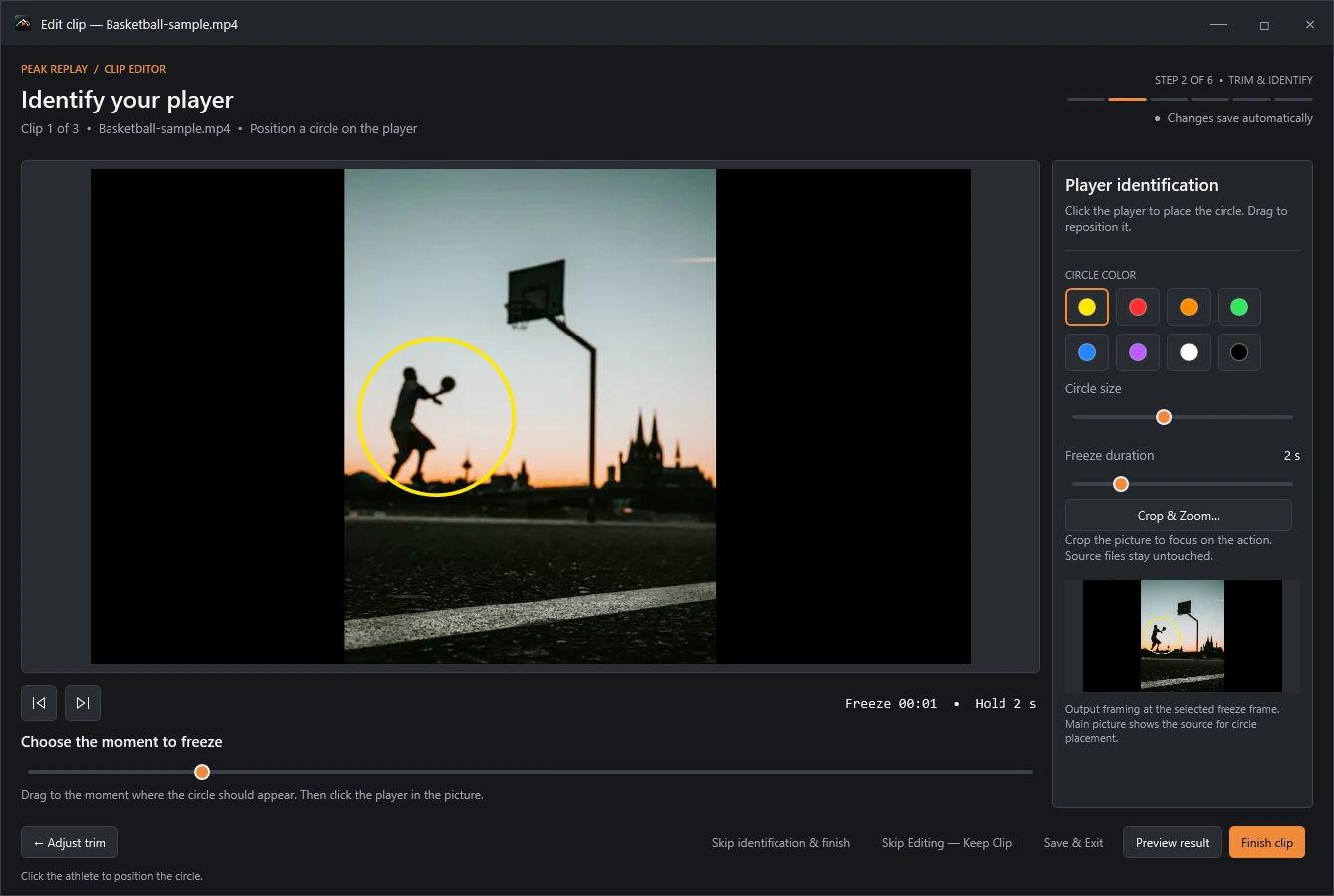
Actual Peak Replay interface with sample media.
Trim to the action, freeze the moment, and add a colored circle so viewers know who to watch.
Add a player profile, opening and closing title cards, music, and the right balance of game audio.
Edit and process video on your computer. Preview the complete reel, then export an MP4 in landscape or vertical format.
FROM GAME DAY TO REPLAY
You bring the moments.
Peak Replay helps you put them together.
Add your game recordings and clips from any folder. Drag them into the order you want.
Find the beginning and end of each play. Trim away the extra footage and identify the player.
Add your player profile and title cards. Choose music and adjust it independently of the game audio.
Watch the complete reel, make your final adjustments, and export a video ready to share.
WHATEVER YOUR GAME
For athletes chasing their next opportunity. For parents capturing their progress. For coaches and teams telling their story.


Soccer / Basketball / Football / Baseball / Volleyball / Lacrosse / Your sport
YOUR NEXT HIGHLIGHT STARTS HERE
Create, edit, preview, and export complete sports highlight videos with the Peak Replay public beta.
No registration. No payment. No license key.
One installer. Download, install, and start your reel.
After the beta, editing, saving, and previewing continue. Previously exported videos remain available. New exports will be disabled.
HighlightReel-Setup.exe · 198,970,368 bytes
SHA-256 for the prepared installer:
B1BBC28B6810C4473DFA6A43AF0D846138D2082E7B8ED7F28E47D19AA96B5714Use this value to verify the installer after downloading.
GOOD QUESTIONS
Everything you need to know
about the public beta.
Yes. The public beta includes all existing editing and exporting features, free through December 31, 2026, at 11:59 PM Pacific Time. No credit card, registration, activation, or license key is required.
Beginning January 1, 2027, Pacific Time, exporting becomes unavailable. You can still create, open, edit, save, and preview projects. Your source videos and previously exported files are not deleted.
Editing and video processing happen locally on your Windows computer. Your game footage does not need to be uploaded to a website to create a reel. You will need internet access to download the installer and access online support or updates.
No. A guided workflow takes you from importing footage through trimming, player identification, arranging clips, adding a player profile and audio, and previewing your export.
Use your own footage from soccer, basketball, football, baseball, volleyball, lacrosse, and other sports. You choose the moments to include; Peak Replay does not automatically detect highlights.
The current version is a Windows desktop application. There is no Mac version at this time.
A commercial version is planned, with a proposed $19.99 one-time lifetime export unlock. That is a future plan, subject to change. Purchasing and license activation are not available in the current beta.
HELP SHAPE WHAT COMES NEXT
Something confusing? Something you love? Tell us what happened and what would make creating your reel easier.
Include your Windows version and app version.
Please don’t send private game footage.